触发方案
脚本语法为 Lua。触发方案的整体概念(触发条件/触发动作的分类)请先阅读 触发方案,本页详细说明 EXPRESSION 类型触发动作脚本的写入参数、返回结构与完整示例。
- 触发逻辑与其他类型触发方案一致,区别在于触发动作的脚本内容。
- 脚本执行完成后,Edge-EMS Builder 后台会解析脚本返回的结果,按结果内容写入指定的点位。
注:需要求使用者有编程基础,并熟悉策略执行流程,具体脚本语法参见 Lua引擎规则。
| 参数名 | 参数值 | 是否必填 | 参数类型 | 描述说明 |
|---|---|---|---|---|
| dataType | Customization | 是 | String | 要操作的数据类型:Customization/Collection/Aggregation/Alarm/Share |
| deviceCode | DeviceA | 否 | String | 从设备编码 |
| dataKey | 功率 | 是 | String | 数据唯一 dataKey 或告警类型 |
| dataValue | 15 | 是 | String | 数据值 或 告警内容 |
| changeMod | true | 否 | String | 是否开启变化写入 |
| availableDate | 2023-01-15T07:00:00+08:00 | 否 | String | 生效日期(Customization) |
| expiredDate | 2023-01-15T10:00:00+08:00 | 否 | String | 失效日期(Customization) |
| mqttConnectionConfigId | 100101 | 否 | String | MQTT 连接配置 ID(Alarm) |
| topic | upload | 否 | String | 告警上传 Topic(Alarm) |
| qos | 1 | 否 | String | QOS(Alarm) |
分时数据(Customization)还支持**每日重复(DailyRepeat)**排班类型:用
availableTime/expiredTime(格式HH:mm:ss,不得跨午夜)代替availableDate/expiredDate,每天循环生效。可直接使用简写函数buildCustomizationWriteMap(dataKey, dataValue, availableDate, expiredDate)(DailyChange 专用)或buildDailyRepeatWriteMap(dataKey, dataValue, availableTime, expiredTime)(DailyRepeat 专用),详见 Lua引擎规则。若脚本中引用的点位取不到值,会被注入哨兵字符串
__Null__,请勿假设其为空字符串或nil,应显式判断${dataKey} == "__Null__"。
local resultList = {}
-- 自定义告警内容local errorMap = {}errorMap.timestamp = OffsetDateTime.now():unixMilli()errorMap.iotCode = ${数据9}errorMap.faultCode = ${数据9}errorMap.faultLevel = ${数据9}errorMap.faultName = ${数据9}errorMap.faultBack = ${数据9}-- 将告警内容转为 JSONlocal errorMessage = toJsonString(errorMap)
table.insert(resultList, buildCommonWriteMap("Customization", "mode", 15, "2023-01-15T07:00:00+08:00", "2023-01-15T10:00:00+08:00", true))table.insert(resultList, buildCommonAlarmMap("二级告警", "二级告警"))table.insert(resultList, buildMqttAlarmMap("一级告警", errorMessage, 1, "upload", 1))table.insert(resultList, buildCommonWriteMap("Collection", "数据10", 200, nil, nil, true))table.insert(resultList, buildCommonWriteMap("Aggregation", "温度", 20, nil, nil, false))table.insert(resultList, buildSlaveWriteMap("DeviceB", "Share", "数据3", 888, nil, nil, false))
return resultList
期望执行结果
Section titled “期望执行结果”期望返回一个包含若干 Table 的数组,Edge-EMS Builder 会解析这个数组,验证数组中对象的内容是否合法,随后返回封装好的写入对象:
[ { "dataType": "",//操作对象 "deviceCode": "",//从设备唯一编码(通过此值确定向哪一台从设备写入数据) "dataKey": "",//操作对象唯一KEY(dataKey 或 alarmType) "dataValue": "",//要写入或告警内容 "changeMod": true,//是否变化写入 "availableDate": "",//分时数据 生效时间 "expiredDate": ""//分时数据失效时间 }]解析执行结果,并验证其内容是否准确,返回预执行封装对象:
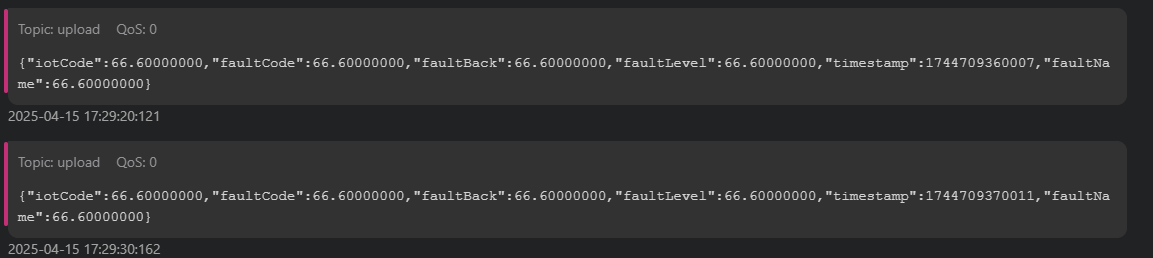
{ "writeCommBridgeContent": [ { "dataKey": "数据10", "dataValue": "200" } ], "writeAggregationDataConfigs": [ { "aggregationDataConfigId": 100004, "dataKey": "温度", "dataName": "温度", "collectionCycle": -1, "expression": "return 15", "status": "Valid", "empty": false, "hasGroup": false, "useLatestValue": true, "note": "", "createdBy": 100001, "createdTime": "2025-03-18T15:04:39.503+08:00", "updatedBy": 100001, "updatedTime": "2025-03-28T10:21:15.578+08:00" } ], "writeAggregationDataValues": [ { "aggregationDataConfigId": 100004, "dataValue": "20", "collectionTime": "2025-04-23T15:30:49.913+08:00" } ], "writeCustomizationDataValues": [ { "customizationDataConfigId": 100003, "dataValue": "15", "availableDate": "2023-01-15T07:00:00.000+08:00", "expiredDate": "2023-01-15T10:00:00.000+08:00", "createdBy": 100000, "createdTime": "2025-04-23T15:30:49.912+08:00" } ], "writeShareDataValues": [ { "shareDataConfigId": 3, "deviceCode": "DeviceB", "dataKey": "数据3", "collectionCycle": 3000, "dataValue": "888", "collectionTime": "2025-04-23T15:30:49.914+08:00" } ], "alarmRecords": [ { "alarmType": "二级告警", "alarmContent": "二级告警", "alarmTime": "2025-04-23T15:30:49.912+08:00", "mark": "None" }, { "alarmType": "一级告警", "alarmContent": "{\"iotCode\":66.60000000,\"faultCode\":66.60000000,\"faultBack\":66.60000000,\"faultLevel\":66.60000000,\"timestamp\":1745393449910,\"faultName\":66.60000000}", "alarmTime": "2025-04-23T15:30:49.912+08:00", "mark": "None", "mqttConnectionConfigId": 1, "topic": "upload", "qos": 1 } ]}告警 MQTT 上传结果
Section titled “告警 MQTT 上传结果”