
Trigger Schemes
Scripts use Lua syntax. For overall concepts, including trigger-condition and action categories, first read Trigger schemes. This page details write parameters, return structures, and complete examples for EXPRESSION trigger-action scripts.
Overview
Section titled “Overview”- Trigger logic matches other scheme types; the difference is the action’s script content.
- After script execution, the Edge-EMS Builder backend parses the returned result and writes the specified points accordingly.
Note: users need basic programming knowledge and familiarity with strategy execution. For script syntax, see the Lua engine reference.
Write parameters
Section titled “Write parameters”| Parameter | Value | Required | Type | Description |
|---|---|---|---|---|
| dataType | Customization | Yes | String | Data type to operate on: Customization/Collection/Aggregation/Alarm/Share |
| deviceCode | DeviceA | No | String | Slave-device code |
| dataKey | 功率 | Yes | String | Unique dataKey or alarm type |
| dataValue | 15 | Yes | String | Data value or alarm content |
| changeMod | true | No | String | Whether to enable writing only on change |
| availableDate | 2023-01-15T07:00:00+08:00 | No | String | Effective date (Customization) |
| expiredDate | 2023-01-15T10:00:00+08:00 | No | String | Expiration date (Customization) |
| mqttConnectionConfigId | 100101 | No | String | MQTT connection configuration ID (Alarm) |
| topic | upload | No | String | Alarm upload topic (Alarm) |
| qos | 1 | No | String | QoS (Alarm) |
Time-scheduled data (Customization) also supports daily repeating (DailyRepeat) schedules. Use
availableTime/expiredTimeinHH:mm:ssformat, without crossing midnight, instead ofavailableDate/expiredDateto repeat daily. Use the shorthandbuildCustomizationWriteMap(dataKey, dataValue, availableDate, expiredDate)for DailyChange orbuildDailyRepeatWriteMap(dataKey, dataValue, availableTime, expiredTime)for DailyRepeat. See the Lua engine reference.Unavailable referenced points are injected as the sentinel string
__Null__. Do not assume an empty string ornil; explicitly check${dataKey} == "__Null__".
Example
Section titled “Example”local resultList = {}
-- Custom alarm contentlocal errorMap = {}errorMap.timestamp = OffsetDateTime.now():unixMilli()errorMap.iotCode = ${数据9}errorMap.faultCode = ${数据9}errorMap.faultLevel = ${数据9}errorMap.faultName = ${数据9}errorMap.faultBack = ${数据9}-- Convert alarm content to JSONlocal errorMessage = toJsonString(errorMap)
table.insert(resultList, buildCommonWriteMap("Customization", "mode", 15, "2023-01-15T07:00:00+08:00", "2023-01-15T10:00:00+08:00", true))table.insert(resultList, buildCommonAlarmMap("二级告警", "二级告警"))table.insert(resultList, buildMqttAlarmMap("一级告警", errorMessage, 1, "upload", 1))table.insert(resultList, buildCommonWriteMap("Collection", "数据10", 200, nil, nil, true))table.insert(resultList, buildCommonWriteMap("Aggregation", "温度", 20, nil, nil, false))table.insert(resultList, buildSlaveWriteMap("DeviceB", "Share", "数据3", 888, nil, nil, false))
return resultListExpected execution result
Section titled “Expected execution result”Return an array containing multiple Tables. Edge-EMS Builder parses it, validates each object’s contents, then returns the encapsulated write objects:
[ { "dataType": "",//Target object "deviceCode": "",//Unique slave-device code identifying the device to write to "dataKey": "",//Unique target key: dataKey or alarmType "dataValue": "",//Value to write or alarm content "changeMod": true,//Whether to write only on change "availableDate": "",//Time-scheduled data effective time "expiredDate": ""//Time-scheduled data expiration time }]Parsed result
Section titled “Parsed result”Parse the execution result, validate its contents, and return encapsulated objects prepared for execution:
{ "writeCommBridgeContent": [ { "dataKey": "数据10", "dataValue": "200" } ], "writeAggregationDataConfigs": [ { "aggregationDataConfigId": 100004, "dataKey": "温度", "dataName": "温度", "collectionCycle": -1, "expression": "return 15", "status": "Valid", "empty": false, "hasGroup": false, "useLatestValue": true, "note": "", "createdBy": 100001, "createdTime": "2025-03-18T15:04:39.503+08:00", "updatedBy": 100001, "updatedTime": "2025-03-28T10:21:15.578+08:00" } ], "writeAggregationDataValues": [ { "aggregationDataConfigId": 100004, "dataValue": "20", "collectionTime": "2025-04-23T15:30:49.913+08:00" } ], "writeCustomizationDataValues": [ { "customizationDataConfigId": 100003, "dataValue": "15", "availableDate": "2023-01-15T07:00:00.000+08:00", "expiredDate": "2023-01-15T10:00:00.000+08:00", "createdBy": 100000, "createdTime": "2025-04-23T15:30:49.912+08:00" } ], "writeShareDataValues": [ { "shareDataConfigId": 3, "deviceCode": "DeviceB", "dataKey": "数据3", "collectionCycle": 3000, "dataValue": "888", "collectionTime": "2025-04-23T15:30:49.914+08:00" } ], "alarmRecords": [ { "alarmType": "二级告警", "alarmContent": "二级告警", "alarmTime": "2025-04-23T15:30:49.912+08:00", "mark": "None" }, { "alarmType": "一级告警", "alarmContent": "{\"iotCode\":66.60000000,\"faultCode\":66.60000000,\"faultBack\":66.60000000,\"faultLevel\":66.60000000,\"timestamp\":1745393449910,\"faultName\":66.60000000}", "alarmTime": "2025-04-23T15:30:49.912+08:00", "mark": "None", "mqttConnectionConfigId": 1, "topic": "upload", "qos": 1 } ]}MQTT alarm upload result
Section titled “MQTT alarm upload result”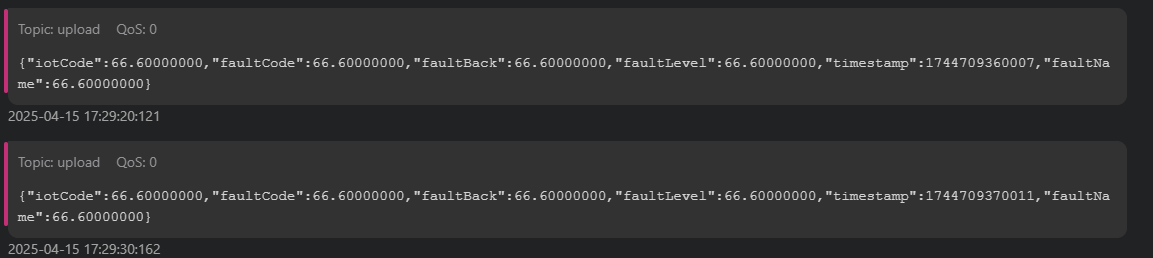
Next steps
Section titled “Next steps”- Overall trigger concepts, condition/action types, and dynamic device discovery: Trigger schemes.
- Complete Lua built-in function and module reference: Lua engine reference.