
Core Capability: MQTT Cloud-Edge Coordination
MQTT channels carry Edge-EMS Builder’s cloud-edge coordination: upstream, they report real-time edge data and decisions to the cloud; downstream, they receive cloud strategies and automatically apply them as local configuration. Cloud-edge coordination is a basic capability across all three product tiers, not an advanced option requiring separate payment or custom development.
1. Connection configuration
Section titled “1. Connection configuration”An MQTT connection configuration describes how to connect to a broker:
| Parameter | Description |
|---|---|
protocol |
mqtt / mqtts (whether TLS is enabled) |
protocolVersion |
Supports 3.1 / 3.1.1 / 5.0 |
serverHost / serverPort |
Broker address and port |
clientId / username / password |
Client identity and authentication information |
cleanSession / keepAliveInterval / connectTimeout |
Session and connection parameters |
An Edge-EMS Builder device can configure multiple MQTT connections simultaneously, for example to a cloud platform and a local gateway. Each publish/subscribe configuration binds to a specific connection.
2. Publishing data: assemble edge data into any format for the cloud
Section titled “2. Publishing data: assemble edge data into any format for the cloud”Publish configuration describes how often to send, which topic to use, and what the content looks like:
| Parameter | Description |
|---|---|
topic / qos |
Publishing destination and quality of service level |
uploadStrategy |
CRON expression controlling the publication schedule |
publishContent |
Lua script returning the content to publish this time |
publishContent uses the same syntax as the expression engine and can construct arbitrary JSON structures:
local payload = {}payload.time = OffsetDateTime.now():unixMilli()payload.power = ${PCS1_有功功率}payload.status = ${PCS1_status}
-- Array fields are also supportedpayload.phaseVoltages = { ${Meter1_Ua}, ${Meter1_Ub}, ${Meter1_Uc} }
return payload
The engine automatically serializes the returned Lua Table to JSON and publishes it to the specified topic. The cloud receives a standard JSON message:
{ "time": 1745393449910, "power": 15.2, "status": "Charging", "phaseVoltages": [220.1, 219.8, 220.5]}3. Subscribing to messages: turn cloud commands into local writes
Section titled “3. Subscribing to messages: turn cloud commands into local writes”Subscribe configuration describes the topic, how received messages are handled, and whether a response is required:
| Parameter | Description |
|---|---|
topic / qos |
Subscription topic and quality of service level |
actionContent |
Lua script parsing the received message and returning a list of write commands |
needResponse / responseTopic / response |
Whether to respond, the response topic, and response content, which can also be assembled by scripts |
After receiving a message, a script obtains the original payload through the fixed variable ${subscribe_message}, parses it, and converts it to write commands:
local messageMap = jsonToMap(${subscribe_message})local strategyList = jsonToListMap(toJsonString(messageMap.params.strategy))local resultList = {}
for i, item in ipairs(strategyList) do    local availableDate = completeDateTime(messageMap.params.date .. "T" .. item.start)    local expiredDate = completeDateTime(messageMap.params.date .. "T" .. item["end"])
    table.insert(resultList, buildCommonWriteMap(        "Customization", "mode", tostring(item.mode), availableDate, expiredDate, false    ))end
return resultList
This script parses a cloud-provided time schedule—a JSON object containing multiple time periods, each with a mode value—into time-scheduled data (Customization) write commands. The cloud sends one JSON payload in the agreed format; the edge automatically applies each period without additional development.
4. Scenarios requiring responses
Section titled “4. Scenarios requiring responses”Some cloud protocols, such as JSON-RPC-style protocols, require execution-result responses after commands. Edge-EMS Builder lets a subscription define both:
responseTopic: the destination topic, which scripts can construct dynamically by extracting fields such asidfrom the original message.response: response content, referencing fixed variables${subscribe_result}for action success and${subscribe_result_message}for detailed execution results.
After sending a strategy, the cloud can therefore determine whether it has taken effect at the edge instead of assuming delivery means success.
5. Typical closed-loop example
Section titled “5. Typical closed-loop example”Cloud sends a time schedule → MQTT subscription action parses the message → writes time-scheduled data effective by period → trigger schemes or frontends subsequently execute the strategy → edge periodically reports execution results according to its publish configuration
This is a common cloud-edge coordination pattern. Strategy delivery and result reporting are independently configured and decoupled, so either can change without affecting the other.
6. Resuming transmission after network outages
Section titled “6. Resuming transmission after network outages”When temporary network loss causes publication tasks to fail, Edge-EMS Builder automatically buffers failed messages in a configurable-size queue. It retransmits them when connectivity returns to avoid losing important reports due to network instability.
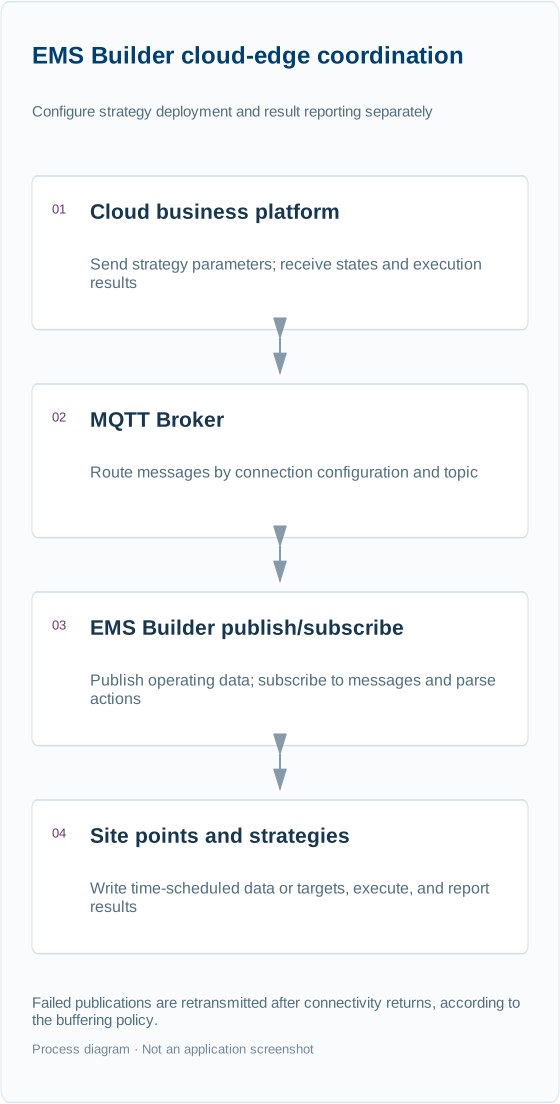
This diagram follows the configuration logic on this page and illustrates data and control flow. Refer to the configuration descriptions and scripts for specific fields.
Next steps
Section titled “Next steps”- Complete publishing/subscription parameters and request/response formats: MQTT publish/subscribe script manual.
- Learn direct coordination between devices, rather than between devices and clouds: Device coordination and shared targets.
- Edge-EMS Builder can also push data to your own frontend in real time: Real-time frontend push and direct control.