
Incremental package configuration
Incremental packages
Section titled “Incremental packages”Package filesystem modifications exactly as they are and upload them to JelinaCloud as an Increment, which can be deployed directly to devices.
Configure a device’s runtime environment first, upload an Increment, and deploy it to reproduce the environment on other devices.
Packaging exclusions
Section titled “Packaging exclusions”Jelina excludes certain cache paths and sensitive configuration. The following are some paths not included in Increment packages:
/adv, /app, /mnt/boot, /mnt/overlay/rw, /mnt/inactive, /mnt/overlay/ro, /tmp, /var/cache, /var/log, /var/backups, /var/tmp, /var/run, /var/mail, /var/volatile, /proc, /sys, /dev, /run, /boot, /lost+found , /etc/systemd/system/jelinvisored_* , /etc/ld.so.cache, /etc/ssh/ssh_host*, /etc/gshadow, /etc/gshadow-, /etc/fstab, /etc/docker, /var/lib/systemd/coredump, /var/lib/systemd/random-seed, /var/lib/dbus, /var/lib/containerd, /var/lib/private, /etc/.pwd.lock , /var/lib/apt/lists, /var/lib/apt/mirrors, /var/lib/logrotate/status, pycache
Use incremental packages
Section titled “Use incremental packages”Bind to a Release
Section titled “Bind to a Release”After configuring a runtime environment, package and upload it, then bind it to a Release. Devices install the bound Increment before deploying the Release to ensure its applications have the correct environment and to standardize runtimes across devices.
Deploy directly
Section titled “Deploy directly”On the fleet/device Actions page, select the Increment to install. Devices install the specified Increment by default.
Upload an incremental package
Section titled “Upload an incremental package”-
Open the fleet’s Increment list and select
Upload Increment. -
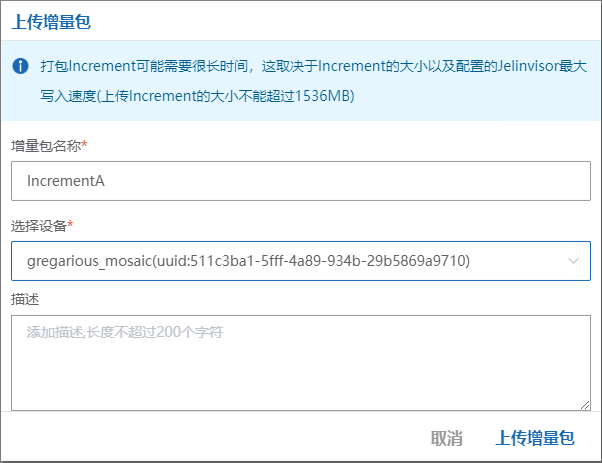
Enter a package name, select a device (only online devices can upload), optionally add a description, and select
Upload Increment.
JelinaCloud notifies the device to package and upload its environment, then associates the uploaded file with the new Increment.
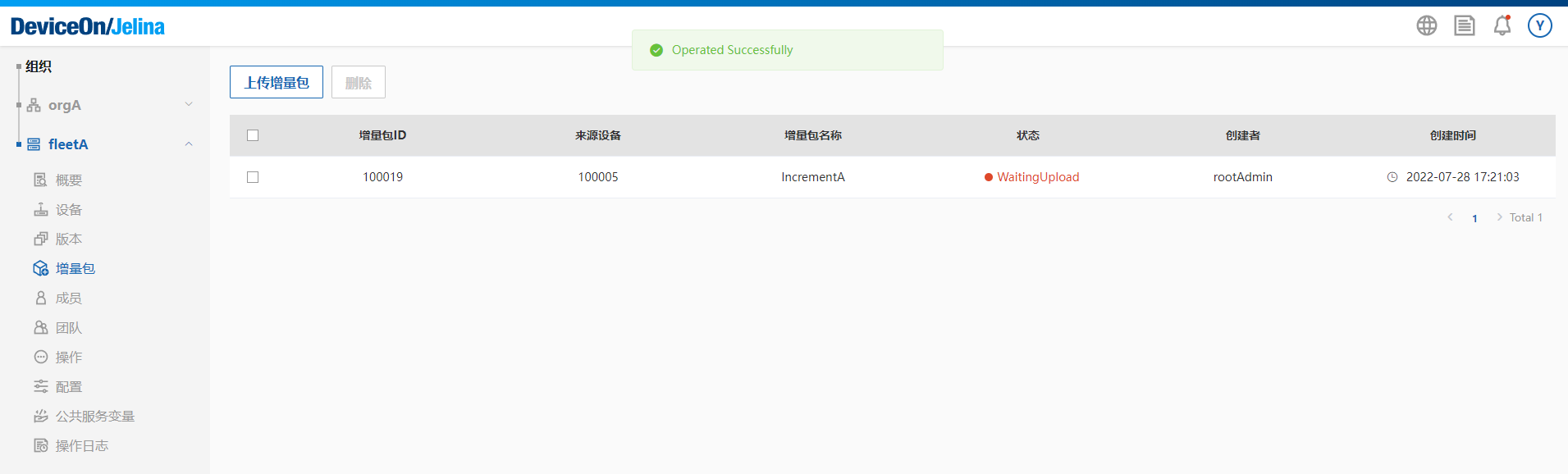
- The new Increment appears in the list.
Publish an incremental package
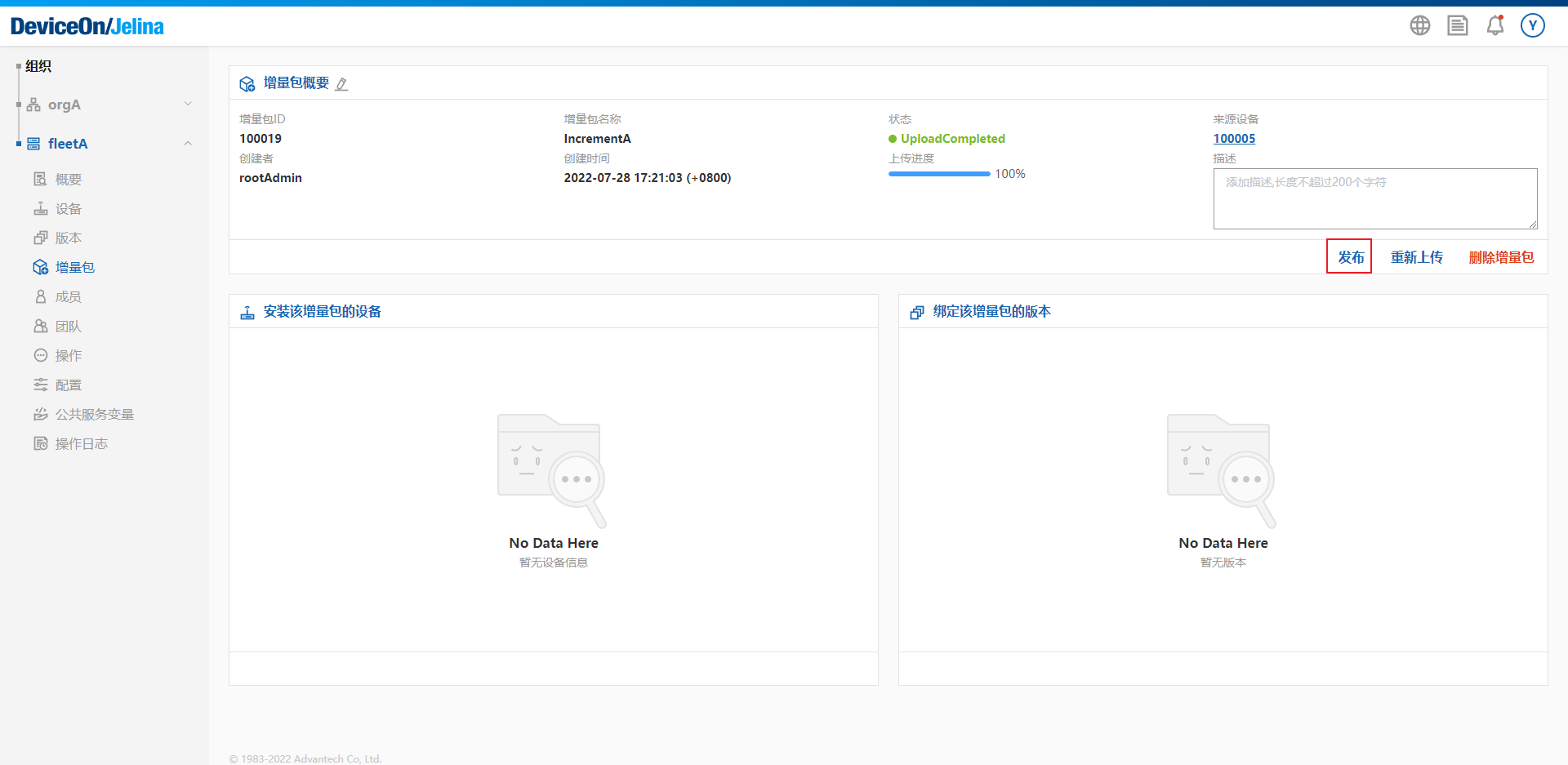
Section titled “Publish an incremental package”After the package finishes uploading, open its overview and select Publish.
Merged uploads and excluded paths
Section titled “Merged uploads and excluded paths”What these options do
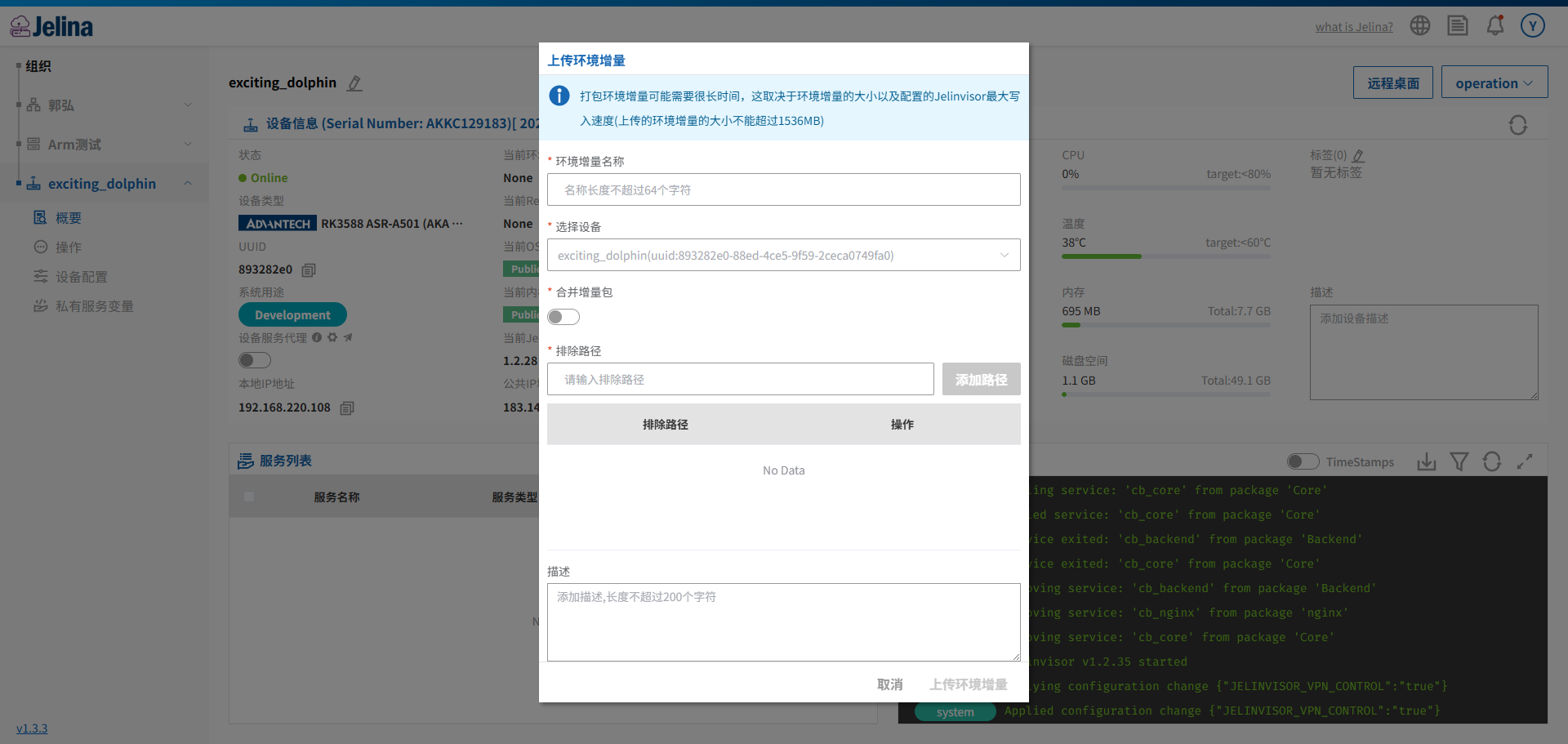
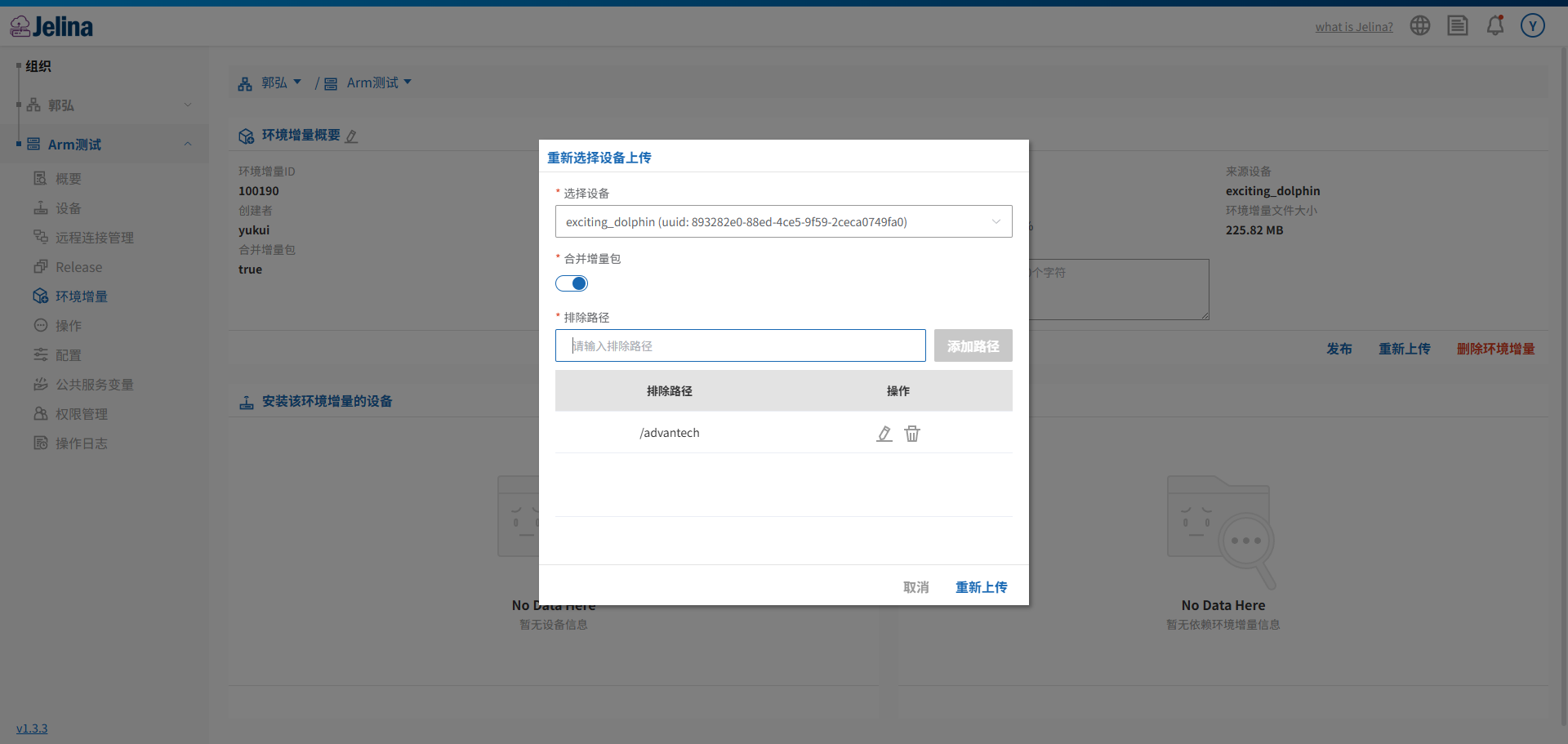
Section titled “What these options do”Previously, repackaging and uploading an Increment followed the device’s installed Increment chain level by level, causing packages to grow as more historical versions accumulated. The upload/re-upload panel now provides two optional settings:
- Merged upload: Combines multiple generations of dependent Increments into a single package, reducing dependency levels and package size and speeding up subsequent installation.
- Excluded paths: Manually omit unnecessary directories or files, such as logs and caches, to further reduce package size.
Both settings are optional. Leaving them unchecked or empty preserves the previous behavior.
Prerequisites
Section titled “Prerequisites”- The target device must be online.
- It must run Jelinvisor ≥ 1.2.27. Otherwise, both settings are unavailable: the switch is disabled and the input cannot be used.
- Merged upload also requires support in the current device environment, as reported by device-side capability checks. The switch remains unavailable if the version qualifies but the environment does not.
Procedure
Section titled “Procedure”For example, to repackage and upload an Increment from a device:
- Open the device’s Increment management page within its Fleet and locate
Upload IncrementorRe-upload. - When the panel opens, the interface checks the device:
- If the version or capabilities do not qualify, the merged upload switch is disabled and a reason is shown, such as:
- “Device Jelinvisor version must be ≥ 1.2.27.”
- “The current device environment does not support merged uploads,” with the specific reason returned by the device.
- If requirements are met, the switch can be selected.
- If the version or capabilities do not qualify, the merged upload switch is disabled and a reason is shown, such as:
- Choose the options you need:
- Select “Merged upload”: Multiple generations of parent Increments are merged into one package. After installation, the device no longer depends on the previous Increment chain.
- Enter “Excluded paths”: Add one or more rules, one per line or individually through the input, for example:
var/lib/docker/excludes that directory.etc/ssh/ssh_host*excludes matching prefixes.*.logexcludes all log files.- Wildcards
*and?are supported; leading./or/does not change the result. - Use complete paths rather than relative forms such as
./.
- Use both options, either one, or neither.
- Verify the settings and select
Upload environment incrementto instruct the device to package and upload. Once started, progress displays as in the original workflow. - If submitted parameters are invalid—for example, merged upload is selected for an older device version—the interface displays an error and blocks submission. Remove unsupported options and try again.
Review the completed upload
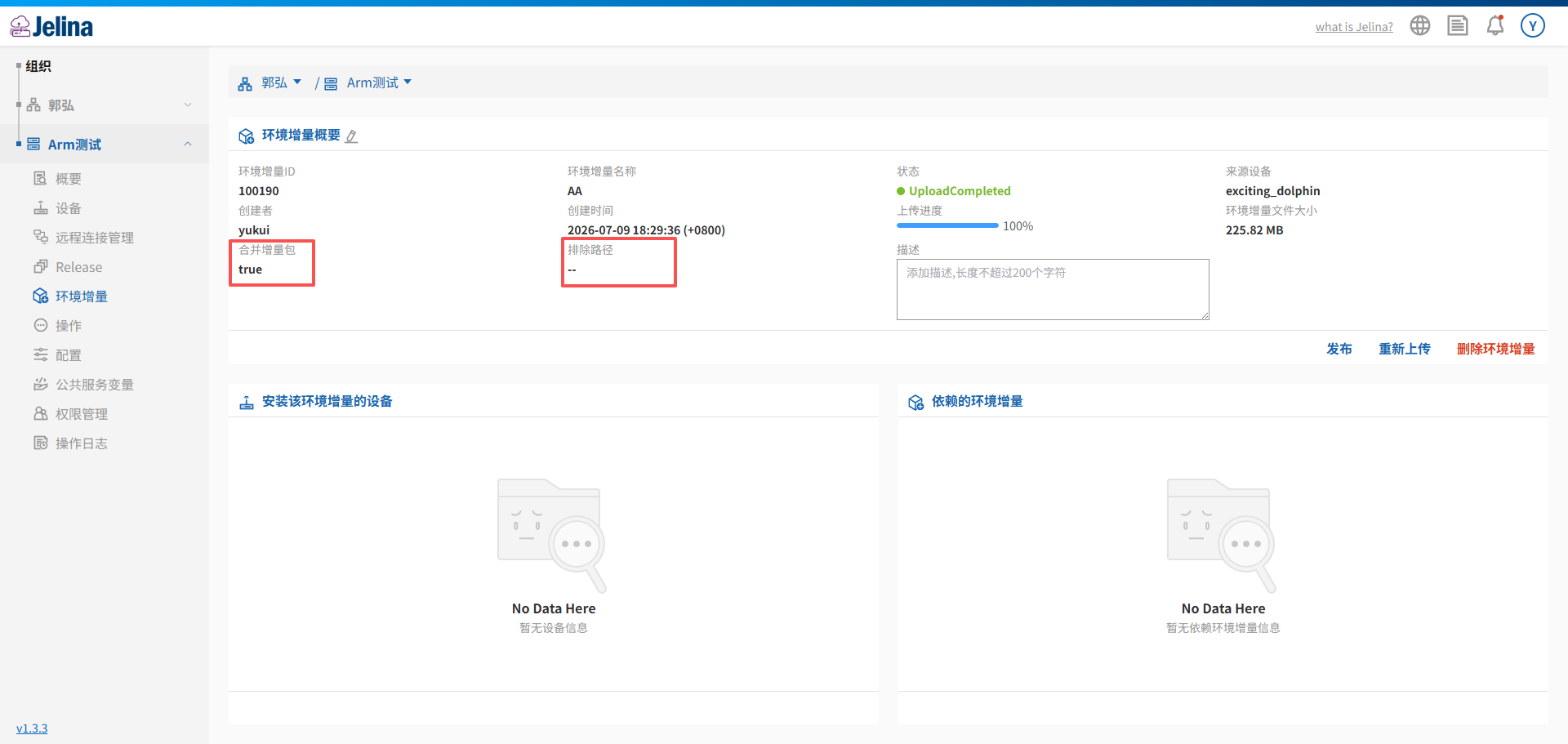
Section titled “Review the completed upload”Increment list and detail pages now also show:
- Whether merged upload was enabled.
- The excluded path rules used, if any.
This records packaging choices for troubleshooting or reuse.
An Increment generated through merged upload no longer shows a “parent Increment” dependency because the merged package already contains those dependencies. Packages uploaded without merging retain the previous dependency display.
Common questions
Section titled “Common questions”Why is the merged upload switch missing? The device runs Jelinvisor below 1.2.27, or its system environment does not support merging despite a sufficient version. Only the previous Increment upload behavior is available.
Do excluded paths alone require additional device capability support? No. Excluded paths require only Jelinvisor ≥ 1.2.27, without a successful merged upload capability check.